A Halloween background can instantly give your phone, laptop, or desktop a seasonal look. Dark forests, glowing jack-o’-lanterns, playful ghosts, and moonlit houses are all popular choices, but an attractive picture isn’t enough on its own. The image also needs to fit your screen, remain sharp, and leave important icons or widgets easy to see.
The best Halloween wallpaper is one that balances atmosphere with everyday usability. Here are nine visual ideas, along with practical advice on resolution, image formats, cropping, and installing your new background.
9 Halloween Wallpaper Ideas Worth Trying
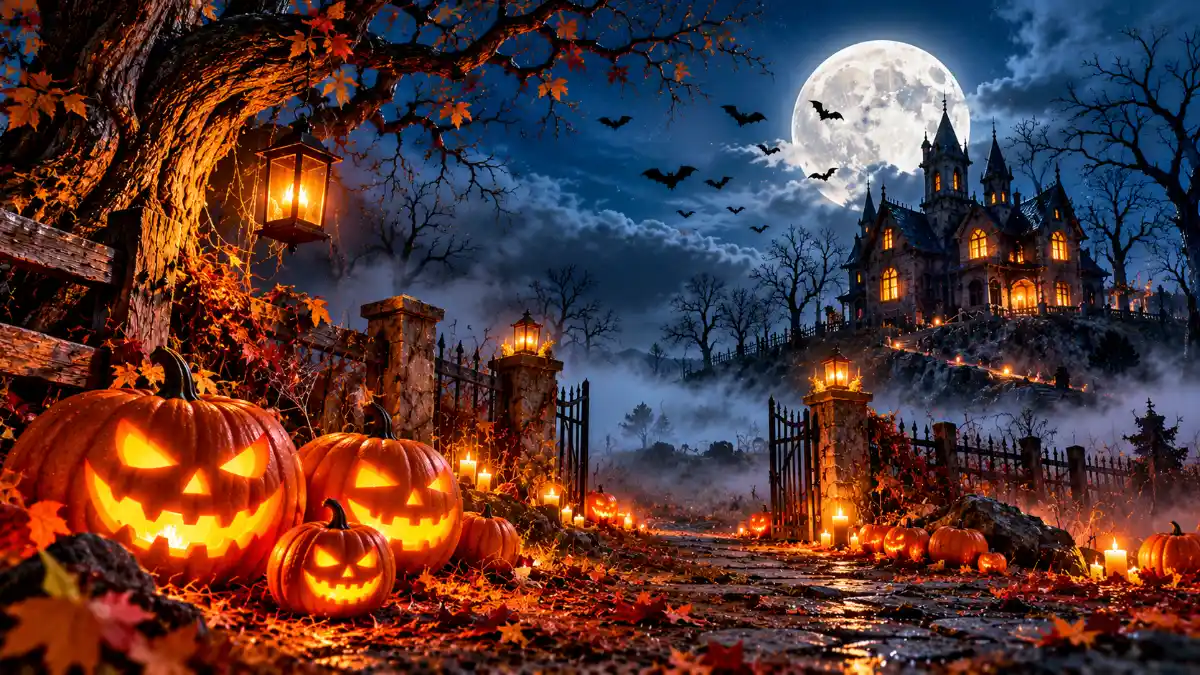
1. Glowing Jack-o’-Lanterns
A carved pumpkin illuminated from inside is one of the most recognizable Halloween images.
Choose a photograph with a dark background if you prefer a dramatic look. The warm orange glow provides a natural focal point without requiring too many visual elements.
For a phone lock screen, an image with the pumpkin positioned toward the lower half can leave room for the clock.
2. Haunted House at Night
A distant haunted house surrounded by fog or bare trees creates a cinematic atmosphere.
This style works particularly well on widescreen desktop monitors because the surrounding landscape helps fill the frame.
A house positioned off-center may also leave more room for desktop shortcuts.
3. Cute Ghost Illustrations
Not every Halloween wallpaper needs to feel frightening.
Simple white ghosts against pastel purple, muted orange, or warm beige backgrounds create a cheerful seasonal appearance.
These illustrations can suit people who want to celebrate Halloween without a dark horror aesthetic.
4. Black Cats and Moonlight
A silhouetted black cat sitting beneath a large moon offers a simple composition with strong visual contrast.
This design works in both portrait and landscape formats, depending on where the cat and moon are positioned.
For smaller screens, clear silhouettes tend to remain more recognizable than highly detailed scenery.
5. Dark Forest Wallpaper
A misty forest, narrow pathway, or collection of twisted trees can give your device a mysterious appearance.
Choose images with moderate contrast if your desktop contains many folders and shortcuts.
Extremely dark artwork may make some icons difficult to distinguish.
6. Minimalist Pumpkin Art
Minimalist wallpaper uses a limited palette and a small number of decorative elements.
A single pumpkin, simple bat silhouette, or delicate spiderweb can look polished without overwhelming your screen.
This style is especially practical if you prefer a clean home screen with multiple widgets.
7. Vintage Halloween Artwork
Retro Halloween illustrations often feature aged textures, traditional pumpkin faces, and muted seasonal colors.
They create a nostalgic atmosphere that’s different from modern horror photography.
Look for high-resolution reproductions or original vintage-inspired artwork rather than enlarging a small image from an old website.
8. Purple and Orange Gradient
A smooth purple-to-orange gradient with subtle Halloween decorations combines seasonal color with a modern interface-friendly look.
Gradients are a good option when you want a Halloween theme without a large foreground subject.
They also provide flexible space for icons, text, and widgets.
9. Autumn Halloween Scenery
A path covered in autumn leaves, pumpkins on a porch, or a warmly lit seasonal display offers a softer Halloween atmosphere.
These photographs work particularly well for users who prefer fall decorations over horror imagery.
They can also remain suitable throughout much of the autumn season.
What Resolution Should Your Halloween Wallpaper Be?
Resolution describes the number of pixels in an image.
A wallpaper generally looks best when its dimensions match or exceed the display area it needs to cover.
Higher pixel counts can provide additional detail, but they don’t automatically improve a blurry or poorly composed source image.
Common Wallpaper Resolutions
| Display type | Common resolution |
| Full HD desktop | 1920 × 1080 |
| QHD desktop | 2560 × 1440 |
| 4K UHD desktop | 3840 × 2160 |
| Portrait phone wallpaper | 1080 × 1920 |
| Higher-resolution portrait artwork | 1440 × 3200 |
Phones vary considerably in resolution and aspect ratio. These portrait dimensions are examples, not guaranteed fits for every model.
Check your device’s display specifications when you want the closest possible match.
HD vs. 4K Halloween Backgrounds
Full HD and 4K UHD images differ mainly in pixel dimensions.
For a standard 1920 × 1080 monitor, a good Full HD image can look sharp. On a 3840 × 2160 display, a genuine 4K image provides more pixels for detailed presentation.
That doesn’t mean everyone needs 4K wallpaper.
A well-composed HD illustration may look better than a low-quality image that has simply been enlarged to 4K dimensions.
Focus on source quality, sharpness, compression, and how the image looks on your screen.
Portrait vs. Landscape Wallpaper
The orientation of the original image is important.
Phone screens generally work best with tall portrait artwork. Desktop and laptop displays usually suit wide landscape compositions.
Cropping a landscape photograph to fit a phone can remove much of the subject. Likewise, expanding a portrait image across a widescreen monitor may require large amounts of cropping or empty space.
When possible, choose artwork created for the intended orientation.
How to Set a Halloween Background on Your Phone
The general process is straightforward:
- Download an image that suits your screen.
- Open your phone’s wallpaper or display settings.
- Select the downloaded photo.
- Adjust the framing and zoom.
- Preview how the clock and icons appear.
- Apply it to your lock screen, home screen, or both.
The exact menu names depend on your phone and operating-system version.
On some devices, you can also begin from the Photos or Gallery application.
How to Change Your Desktop Wallpaper
On Windows, the wallpaper controls are generally found under Personalization in Settings.
Select the background option, choose your picture, and adjust the fit.
On macOS, wallpaper controls are available through System Settings. Select a custom image or choose one from the available options.
Menu names and arrangement may change between software versions.
If the wallpaper looks stretched, try a different fit setting or select an image with a closer aspect ratio.
Which Image Format Works Best?
JPEG is commonly used for photographic wallpapers because it can preserve detailed images with manageable file sizes.
PNG is useful for illustrated designs, particularly where crisp graphic edges matter.
WebP can offer efficient compression, although compatibility with native wallpaper workflows varies by application and device.
For ordinary wallpapers, choose a format supported directly by your device rather than converting files unnecessarily.
Where to Find Quality Halloween Wallpapers
Start with reputable image libraries such as Unsplash or Pixabay.
Search more precisely for what you need. Phrases such as Halloween phone wallpaper, 4K pumpkin wallpaper, or minimalist spooky wallpaper may produce more relevant images than a broad search alone.
Inspect the individual image before downloading, including its dimensions and usage conditions.
Avoid These Wallpaper Problems
An excessively busy background can make desktop icons hard to read.
Bright detail directly behind the lock-screen clock may reduce visibility. Similarly, a subject placed near the screen edge may disappear when your device crops the image.
Avoid stretching low-resolution photographs. If your chosen image is too small, search for a larger original rather than repeatedly enlarging the downloaded preview.
Preview the image on the actual device before deciding whether it works.
Final Thoughts
Choosing a Halloween background is partly about personal taste and partly about screen compatibility. A glowing pumpkin may create the perfect seasonal atmosphere, while minimalist illustrations keep your device organized and readable.
Select the style you enjoy, match its orientation to your screen, and use a high-quality source image. You don’t need the largest possible file-just one that looks sharp and fits comfortably.
- Read more: Halloween Background